Business Central or Finance & Operations: which Microsoft ERP fits your business?
A plain-language comparison of Dynamics 365 Business Central and Finance & Operations: what each does, what it costs, how it's built, and how to choose.
BCS team7 min read
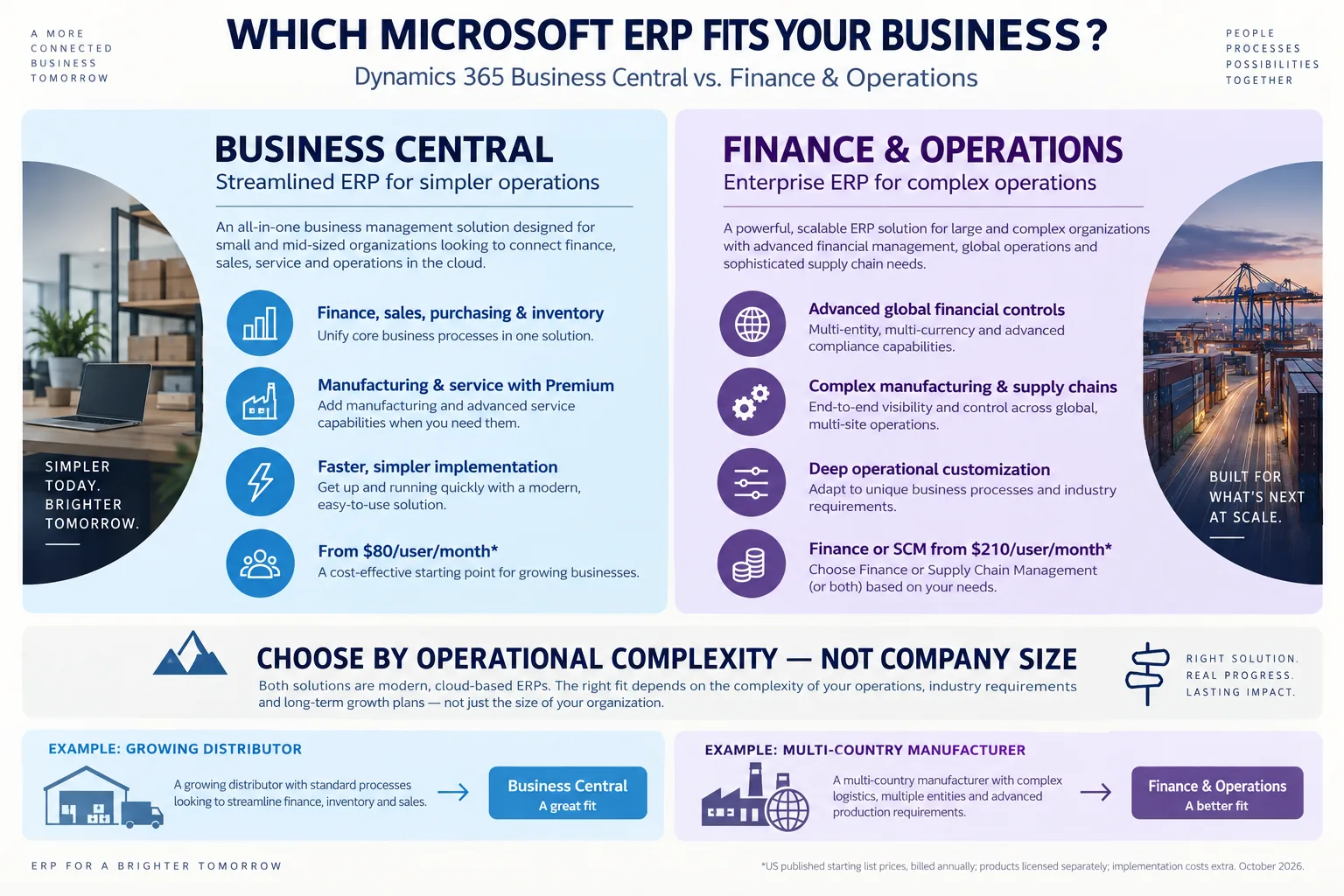
Microsoft offers two complete ERP systems under the Dynamics 365 name: Business Central and Finance & Operations. Both run your finance, sales, purchasing and inventory in one place. So which one is right for you? Here is a plain-language guide, without the jargon.
Two products, two different jobs
“Finance & Operations” (often shortened to F&O) is the name for Microsoft's enterprise ERP family, mainly Dynamics 365 Finance and Dynamics 365 Supply Chain Management. Business Central is a separate, all-in-one product for small and mid-sized businesses.
Streamlined ERP for simpler operations
Business Central
Best for: small and mid-sized businesses that want finance, sales, service and operations connected in the cloud.
- Finance, sales, purchasing and inventory in one system
- Manufacturing and service when you add Premium
- Faster, simpler implementation
- From $80 per user per month
Enterprise ERP for complex operations
Finance & Operations
Best for: large or complex organisations with global finance and sophisticated supply chains.
- Multi-company, multi-currency, advanced compliance
- Complex manufacturing and supply chains across sites
- Deep customisation for unique processes
- Finance or Supply Chain from $210 per user per month
Where do you sit? A one-minute check
Every “yes” below is a sign of the kind of complexity Finance & Operations is built for.
Quick fit check
Answer six questions about your business. It takes a minute.
- 1.Do you run several companies across countries, with different currencies and consolidation rules?
- 2.Do you manufacture across several sites, with advanced scheduling or shop-floor control?
- 3.Do you run large or complex warehouses, such as wave picking, advanced put-away or transport planning?
- 4.Does a parent company, regulator or auditor require advanced financial controls?
- 5.Do your processes need deep, industry-specific customisation?
- 6.Do you expect your operations to become much more complex in the next three to five years?
0 of 6 answered. Your result appears when all six are done.
A starting point for a conversation, not a recommendation. The right choice comes from a proper requirements review.
Side by side: what each one does
Both products cover the whole business. The difference is how far each one goes. Read the table as “more” or “less”, not “has it” or “doesn't”.
| Area | Business Central | Finance & Operations |
|---|---|---|
| Who it's for | Small and mid-sized businesses (it can grow with larger ones too) | Mid-sized to large companies with complex operations |
| Finance | Strong accounting, budgets, cash flow and fixed assets | Deeper global finance, advanced controls and enterprise-wide processes |
| Several companies | Supported, including intercompany transactions | Built for many legal entities, countries and organisation structures |
| Sales & purchasing | Everything most businesses need, out of the box | Advanced procurement, sourcing, trade agreements and controls |
| Inventory & warehouse | Solid inventory and warehouse management | Advanced warehousing and complex order fulfilment |
| Manufacturing | BOMs, routings, work centres and production orders (Premium) | Advanced production control, scheduling and shop-floor integration |
| Supply chain | Purchasing, inventory planning and replenishment | Supply planning, warehousing, transportation and asset management |
| Projects | Projects, budgets, resources and job costing | More sophisticated project accounting and controls |
| Service | Service orders and contracts (Premium) | Enterprise asset management; other service needs use extra Dynamics apps |
| HR & payroll | Basic employee records; payroll through partner apps | Wider HR options in the Dynamics family; payroll usually needs a local solution |
| Reporting | Standard reports, Excel and Power BI | Enterprise reporting, financial analytics and Power BI |
| Implementation | Usually faster and simpler | Usually longer and more involved |
| Total cost | Generally lower | Generally higher |
Who it's for
Business Central: Small and mid-sized businesses (it can grow with larger ones too)
F&O: Mid-sized to large companies with complex operations
Finance
Business Central: Strong accounting, budgets, cash flow and fixed assets
F&O: Deeper global finance, advanced controls and enterprise-wide processes
Several companies
Business Central: Supported, including intercompany transactions
F&O: Built for many legal entities, countries and organisation structures
Sales & purchasing
Business Central: Everything most businesses need, out of the box
F&O: Advanced procurement, sourcing, trade agreements and controls
Inventory & warehouse
Business Central: Solid inventory and warehouse management
F&O: Advanced warehousing and complex order fulfilment
Manufacturing
Business Central: BOMs, routings, work centres and production orders (Premium)
F&O: Advanced production control, scheduling and shop-floor integration
Supply chain
Business Central: Purchasing, inventory planning and replenishment
F&O: Supply planning, warehousing, transportation and asset management
Projects
Business Central: Projects, budgets, resources and job costing
F&O: More sophisticated project accounting and controls
Service
Business Central: Service orders and contracts (Premium)
F&O: Enterprise asset management; other service needs use extra Dynamics apps
HR & payroll
Business Central: Basic employee records; payroll through partner apps
F&O: Wider HR options in the Dynamics family; payroll usually needs a local solution
Reporting
Business Central: Standard reports, Excel and Power BI
F&O: Enterprise reporting, financial analytics and Power BI
Implementation
Business Central: Usually faster and simpler
F&O: Usually longer and more involved
Total cost
Business Central: Generally lower
F&O: Generally higher
Manufacturing and service management in Business Central need the Premium licence. In Finance & Operations, what you get depends on which apps you license.
What it costs
Microsoft's published US list prices per user per month, billed yearly:
Business Central
Essentials
$80per user / month
Finance, sales, purchasing, inventory and projects.
Business Central
Premium
$110per user / month
Everything in Essentials, plus manufacturing and service.
Finance & Operations
Finance
$210per user / month
The Premium edition is listed at $300.
Finance & Operations
Supply Chain Management
$210per user / month
The Premium edition is listed at $300.
The licence is only part of the cost. Plan for implementation, data migration, training, integrations, customisation and support, and look at what it will cost to grow the system over the next three to five years. Users who need more than one Finance & Operations app can often use cheaper “attach” licences for the second one, and prices differ by country.
For your IT team: how they're built
This matters if you plan integrations, custom development or long-term maintenance.
| Area | Business Central | Finance & Operations |
|---|---|---|
| Programming language | AL | X++ |
| Developer tools | Visual Studio Code | Visual Studio with F&O tooling |
| How you customise | Apps and extensions that subscribe to events | Extensions, Chain of Command and event handlers |
| Integration | REST APIs and web services | OData, custom services and data entities |
| Moving data in | Configuration packages, APIs and migration tools | Data Management Framework and data entities |
| Power Platform | Power Automate, Power Apps and Dataverse | Power Platform, Dataverse and dual-write |
| Where it runs | Microsoft cloud (SaaS) or on your own servers | Microsoft-managed cloud, plus some specialised deployment options |
| Updates | Fairly smooth, especially in the cloud | Managed cloud updates; your extensions need testing each time |
Programming language
Business Central: AL
F&O: X++
Developer tools
Business Central: Visual Studio Code
F&O: Visual Studio with F&O tooling
How you customise
Business Central: Apps and extensions that subscribe to events
F&O: Extensions, Chain of Command and event handlers
Integration
Business Central: REST APIs and web services
F&O: OData, custom services and data entities
Moving data in
Business Central: Configuration packages, APIs and migration tools
F&O: Data Management Framework and data entities
Power Platform
Business Central: Power Automate, Power Apps and Dataverse
F&O: Power Platform, Dataverse and dual-write
Where it runs
Business Central: Microsoft cloud (SaaS) or on your own servers
F&O: Microsoft-managed cloud, plus some specialised deployment options
Updates
Business Central: Fairly smooth, especially in the cloud
F&O: Managed cloud updates; your extensions need testing each time
Real-world examples
How the choice usually plays out for typical businesses:
Local trading company, 40 employees
Standard finance, purchasing, sales and inventory.
Business Central
Growing retailer with several branches
Core business management across a few locations.
Business Central
Manufacturer with simple BOMs and production orders
Manufacturing without the need for an enterprise ERP.
Business Central Premium
Service company that runs projects and bills clients
Project accounting and day-to-day operations are built in.
Business Central, after a requirements check
Manufacturer with multi-site production, advanced scheduling and warehousing
Needs enterprise depth in operations.
Finance & Operations
International group with complex financial governance
Needs advanced financial and organisational control.
Finance & Operations
The bottom line
Both are strong, strategic Microsoft ERPs. Business Central gives you a complete, integrated system with a simpler rollout and a lower cost. Finance & Operations gives you deeper enterprise capability for sophisticated finance, manufacturing and supply chains.
The right answer depends on the processes you need to support today, how you expect to grow, and your five-year technology plan, not just on headcount or revenue. A short requirements and fit-gap review settles it.
Prices are Microsoft-published US list prices with annual billing, checked October 2026. They exclude implementation, extensions, support and taxes, and vary by region. Sources: Business Central pricing, Finance pricing, Supply Chain Management pricing.